
Category: Uncategorized

  • Virtual 3D Math

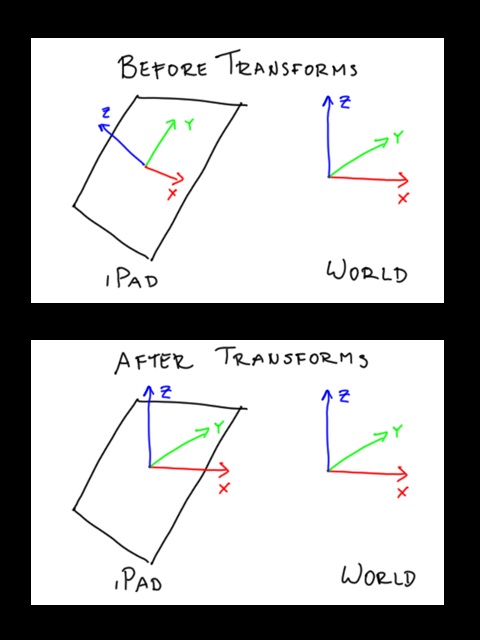
    Last time, I posted a starfield video which demonstrates an iPad being used to look around in a virtual 3D environment. So how is this done? The basic idea is to line up the xyz coordinate system of the iPad to the xyz coordinate system of the world. Well, the world doesn’t really have an xyz coordinate system, but we’ll call “z” the direction that lines up with gravity and “y” the direction that lines up with North.

    The first step, as you might guess, is to use the iPad’s accelerometer and compass to find out what direction gravity and north are in. Then, it’s a matter of taking those to vectors and rotating everything so that the iPad’s z-direction (which is initially pointing perpendicular to the screen towards you) to line up with the gravity vector and the iPad’s y-direction (which is initially pointing to screen right) to line up with the north vector. Here are the steps involved:

    • rotate z so that the iPad’s new xz-plane lines up with the gravity vector
    • rotate y so that the iPad’s new z-direction lines up with gravity
    • recalculate the north vector in this new coordinate system
    • rotate z again so that the iPad’s new y-direction now points north

    But how do you know how much to rotate by? Well, that’s where trigonometry comes in. Let’s call your gravity vector . If that happens to be <0, 0, -1>, that means your iPad is lying flat on a table or something and you wouldn’t have to do anything. But for anything else, you’ll want to line up your new xz-plane with this . In other words, you need to figure out the angle between and <1, 0>. You do this by taking the arctangent of Gy over Gx, or “atan2(Gy, Gx)”.

    The rest is left as an exercise for the reader…

  • Starfield 3D Test

    On Monday, I mentioned that it’s possible to use the compass and accelerometer on the iPad to create a virtual world display. This video illustrates what I was talking about:

    http://www.youtube.com/v/Ci4LD5ngCdc

    Actually, you don’t need an iPad to do this. You could do this with any device that has a compass and accelerometer. In fact, there are several apps that do something like this for the iPhone 3GS. But I don’t have one of those, so this was my first chance to try it out for myself. Also, the starfield looks pretty awesome on a big display. On Friday, I’ll go over some of the math used to do this effect.

  • Compass + Gravity

    I recently discovered that my iPad has a compass, which was a bit of a surprise since I thought it would be like the iPhone where only the 3G version had it and I only got the wi-fi one. So now I’ve got a device that can tell which direction gravity pulls in (with the accelerometer) and can point to magnetic north (with the compass).

    Neither sensor is terribly accurate but with a bit of filtering, I can get two reasonable vectors. And with two vectors, I can create a coordinate system. And with that, I can create a crude virtual world display. I’ll post a video next time showing what I mean…

  • I’ve Figured It Out

    With his ear-piercing cries, razor-sharp fingernails, and poison-gas cloud flatulence, my baby is the perfect killing machine. But then I watch him fall asleep on my chest after a particularly vigorous feeding and I think, “Aww … he’s just so cute…”

    That’s when he’s going to strike, when I least expect it.

  • Italian Review of Mach Dice

    My first app, Mach Dice, was reviewed on iPhoner.it, an Italian iPhone site. I can’t actually read Italian, but from the Google translate version, it sounds like they liked it.

  • Air Hockey Gold

    If you’ve got an iPad, check out Air Hockey Gold. It’s air hockey, on an iPad. What could be simpler? And it’s free! Also, for a limited time, it’s got an ad for my game Castle Tiles.

    I happen to know the guy who made Air Hockey and in his free version for the iPad, he wanted to run some ads. But the major ad providers like Google AdSense didn’t have iPad versions of their SDK available at launch. So he just put up his own ads for friends’ apps, including mine. My ad will go away once he gets the more “official” ads working but in the meantime, it’s free publicity!

  • Boom Dice 2.0

    Hey, did you buy my iPhone game Boom Dice a while back? Guess what! I finally finished the update. I know, I know, it took a while. But things have been busy at work, we were in India for a few months, we had a baby, the whole iPad thing… But through it all, I’ve been working a little bit here and a little bit there on version 2.0 for Boom Dice. (Also, I wanted to wait until I actually got an iPad to make sure it worked on it.)

    So what’s in the new update? Well, a picture is a worth a thousand words so a video composed of lots of pictures and sound must be worth … a bunch more? Anyways, check it out and buy it on iTunes!


    http://www.youtube.com/v/Uqe6tKyA_wI

  • New Castle Tiles Demo Video!

    I finally got my iPad on Monday, which means a new Castle Tiles demo video using a real iPad. This was also after my v1.10 upgrade so the new demo shows off team play as well! It’s still the same basic game, but playing in teams makes it much more dynamic.


    http://www.youtube.com/v/oie8cHqctDA

    By the way, first impressions on the iPad: great for casual browsing, light computing, and lots of potential as a gaming device…

  • iPad vs. Simulator

    I still don’t have my iPad yet (accidentally sent it to work instead of home) but a friend came over on Sunday with his shiny new iPad. We tried Castle Tiles on it and it was a blast! But we also discovered a few differences between the actual iPad device and the simulator:

    • the iPad can handle up to 11 touches at once!
    • it’s about 66% the size of the simulator on my computer monitor
    • it’s a lot faster than the simulator
    • the transparency trick I did to render the background doesn’t work!

    So if you’ve purchased Castle Tiles already, you’ll see a black background for now. But not to fear, I’ve already fixed it and submitted an update, which you’ll get for free whenever Apple approves it. As a bonus, I’ve tweaked the AI and added alliances so you can play in teams!

  • Castle Tiles Demo Video

    If you enjoy this video, please post a comment at http://forums.toucharcade.com/showthread.php?t=50277 and help spread the word about my app. Thanks!


    http://www.youtube.com/watch?v=DClA0XM_fVM